Parameter · Value
Designer · Kartalbey
Size · 20.54 MB
Format · MTZ
Compatibility · HyperOS / MIUI (Xiaomi, Redmi, POCO)
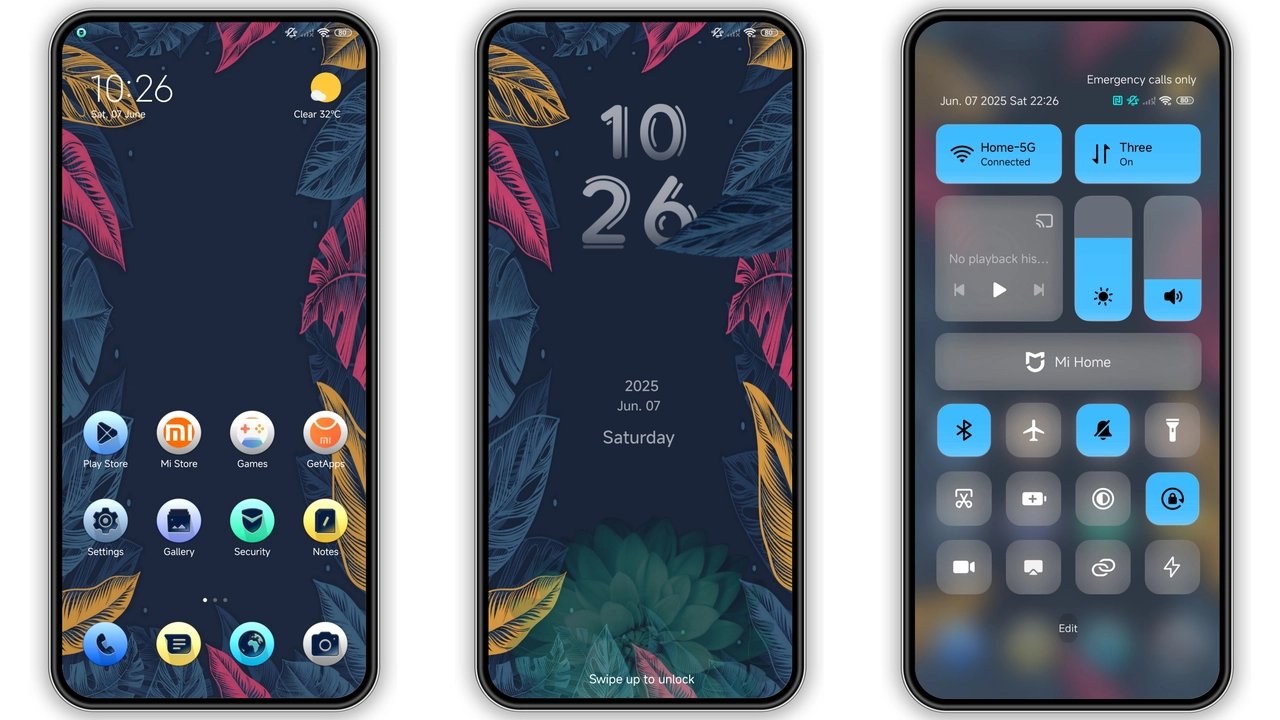
Leaf‑Laden Aesthetic: Visual Details
Color Leaves drops a canopy of muted greens across every UI element. Icons receive a subtle gradient that mimics sunrise through foliage, while wallpapers showcase high‑resolution shots of dew‑kissed leaves. The lock screen adopts a dynamic overlay: as you swipe, a soft ripple follows the motion, echoing wind through trees. Status bar icons shift to a slightly lighter hue for readability against the darker background. Always‑on Display (AOD) mirrors the lock screen’s motion, offering a low‑power glance at time and notifications framed by a translucent leaf pattern. The overall vibe feels organic, yet the palette stays restrained—no neon flashes, just natural tones that blend with most home‑screen arrangements.
Suggested Read: Sleek Dark Theme for Redmi Note 12 Pro – HyperOS Ready
Who’ll Love This Green‑Fresh Palette
The theme targets users who appreciate nature‑inspired design without sacrificing clarity. If you enjoy minimalist aesthetics but want a touch of color, this fits. It appeals to:
• Xiaomi, Redmi and POCO owners who want a unified look across system apps.
• Users who switch between light and dark mode; the leaf hues adapt gracefully.
• Fans of subtle animation; the lock‑screen ripple is gentle, not distracting.
• People who customize icon packs; the theme’s icon set is self‑contained yet works well with third‑party packs that follow a flat style.
Installation Walkthrough & What to Expect
1. Download the MTZ file from the theme’s page. The file size is just over 20 MB, so it finishes quickly on Wi‑Fi.
2. Open the Theme Store app on your device. If you’re on a custom ROM, ensure the store is installed; most MIUI‑based ROMs include it by default.
3. Tap the three‑dot menu → Import → locate the downloaded MTZ file → Apply.
4. After applying, the system may prompt a reboot. A quick restart clears any cached assets and guarantees the new wallpapers, icons and AOD render correctly.
5. Post‑install, navigate to Settings → Display → Theme to fine‑tune accent colors or switch back to stock if desired.
Expect the theme to replace the default launcher icons, lock‑screen background, status‑bar colors and AOD layout. System fonts remain untouched, preserving readability. If you use a custom launcher, you may need to manually enable the icon pack within the launcher’s theme settings.
Performance & Battery Impact
Because Color Leaves relies on native MIUI theming mechanisms, it adds negligible CPU overhead. The dynamic lock‑screen ripple uses a lightweight animation framework already present in HyperOS, so battery draw stays within normal limits. Users have reported no noticeable lag in app launch times or scrolling. The AOD’s translucent leaf overlay consumes a fraction more power than the stock AOD, but the difference is minimal—typically under 1% per hour of screen‑off time.
Pros and Cons
• Pros
• Cohesive visual language across system UI.
• Subtle animations enhance rather than distract.
• Low impact on performance and battery.
• Easy install via MTZ file; no third‑party tools required.
• Works on HyperOS and MIUI across Xiaomi, Redmi and POCO models.
• Cons
• Icon set is fixed; users seeking extensive custom icon packs must overlay manually.
• No dark‑mode specific variant; colors stay the same in both modes.
• AOD overlay may appear slightly dimmer on devices with lower brightness settings.
Overall, Color Leaves delivers a fresh, nature‑infused makeover that feels at home on any Xiaomi‑branded device. Its modest size, straightforward installation and gentle performance footprint make it a solid addition to any HyperOS or MIUI collection.
Theme Preview

Download Links
Use the buttons below to open the theme file and the supporting link.
Color leaves Theme mtz File
Helpful links
More Theme Updates
For more curated HyperOS and MIUI theme updates, visit Hyper OS x MIUI .


