
Parameter · Value
Designer · Shichuanghulian
Size · 7.34 MB
Format · MTZ
Compatibility · HyperOS, MIUI
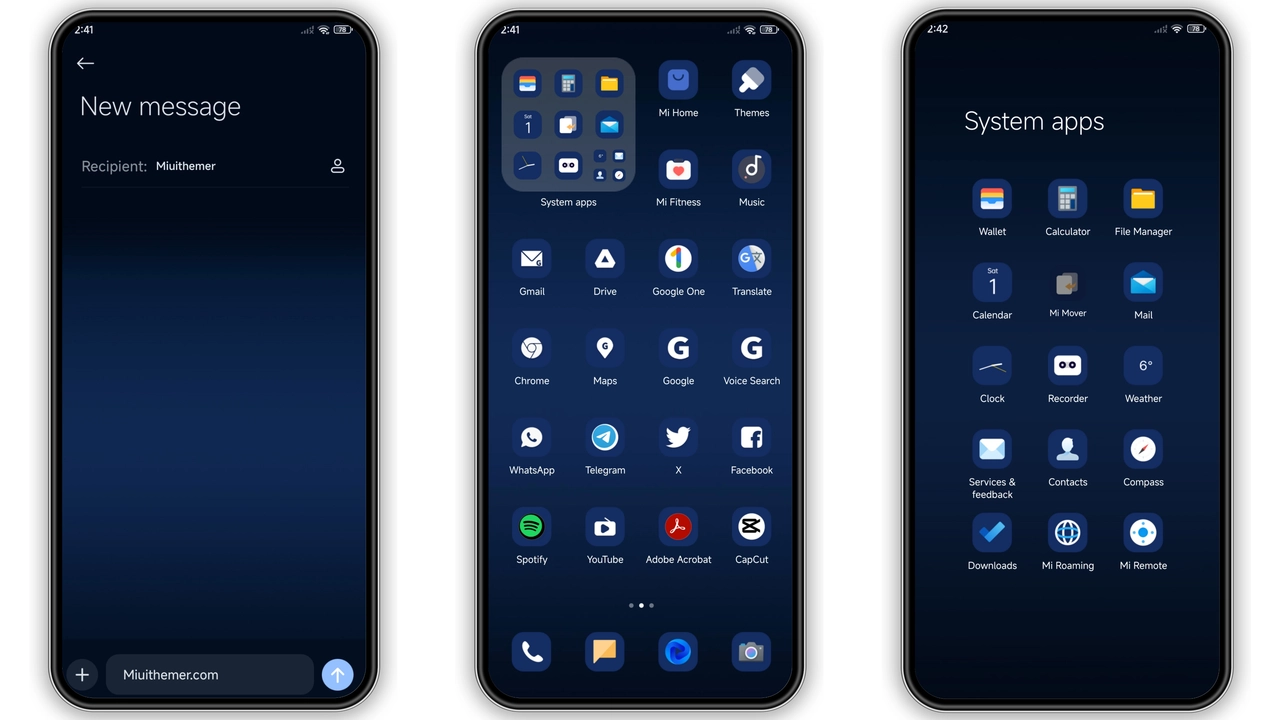
Moonlit Color Palette and Iconography
Deep navy backdrop sets tone. Subtle lunar gradients soften edges. Icons switch to crisp white outlines. Wallpaper cycles between soft blues and midnight hues. Lock screen shows slow orbiting moon animation. Always‑on display mirrors night theme. Status bar adopts teal highlights. Navigation bar stays minimal. Font remains system default for readability. Minor accent colors appear on notification badges.
Suggested Read: Lipid HyperOS 3.0 Theme – iOS‑Style Control Center Archive
Ideal Users and Everyday Feel
Fans of dark aesthetics gravitate here. Users seeking calm, non‑distracting UI find comfort. Minimalists appreciate clean lines. Night‑owl gamers notice reduced glare. Professionals who work long hours enjoy eye‑strain reduction. Anyone wanting a fresh look without overhauling system fonts will like it.
Device Compatibility and Performance
Works on HyperOS‑powered Xiaomi, Redmi and POCO devices. MIUI builds also support the package. No root required. Theme size stays under 8 MB, leaving ample storage. Battery impact negligible; dark palette reduces OLED power draw. System animations remain smooth; no lag reported. Third‑party icon packs remain compatible thanks to depth‑adaptation logic.
Installation Steps and Download Tips
Open official theme store page on device. Locate the Bright Moon download button. Tap to fetch the MTZ file. After download, launch Theme Store app. Choose "Import" from bottom menu. Select the downloaded MTZ file. Preview theme, then apply. Restart device for full overlay activation. If import fails, clear Theme Store cache and retry. Ensure enough free space before download.
Pros and Cons
Pros
• Elegant dark‑blue aesthetic
• Dynamic lock‑screen animation
• Low storage footprint
• Compatible with third‑party icons
• Minimal battery impact
Cons
• No built‑in light mode variant
• Custom font options unavailable
• Requires manual restart for perfect rendering
Theme Preview
Download Links
Use the buttons below to open the theme file and the supporting link.
Bright moon Theme mtz File
Helpful links
More Theme Updates
For more curated HyperOS and MIUI theme updates, visit Hyper OS x MIUI .


