Parameter · Value
Designer · Md Kabir
Size · 11.20 MB
Format · MTZ
Compatibility · HyperOS / MIUI
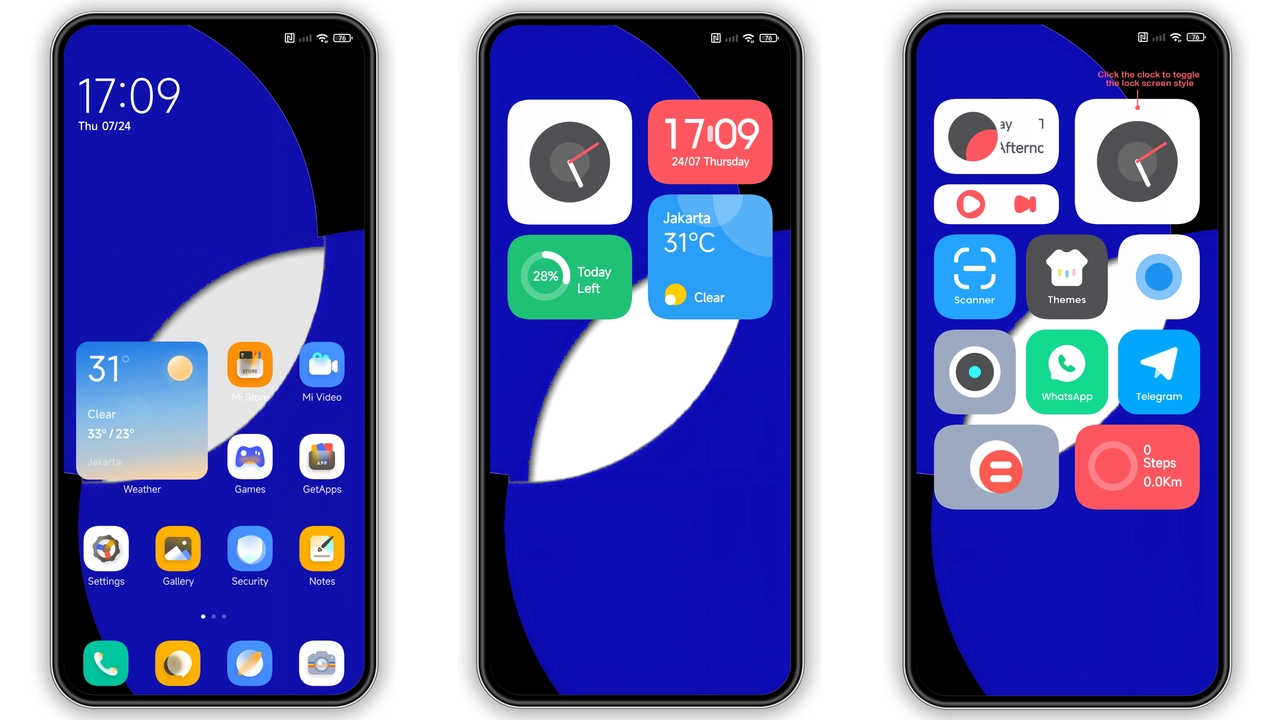
Deep‑Blue Icon Pack Redefines Home Screen
Icons adopt cool cyan shade. Shapes stay crisp. Shadows add depth. Grid feels airy. App labels switch to white for contrast. Widgets blend without clashing. Overall vibe feels modern yet familiar. Battery and signal icons inherit theme hue, keeping UI coherent.
Suggested Read: Poo-Max3 HyperOS 3.0 Theme for Xiaomi Redmi Devices
Dynamic Lock Screen & Always‑On Display Shine
Lock screen animates subtle wave when swiped. Time font enlarges, glowing blue outline. Notification icons match theme palette. AOD shows rotating gradient circle, echoing home screen colors. Battery indicator glows green when full, amber when low—still within blue scheme.
Who’ll Love This Cool Cyan Vibe
Xiaomi power users seeking fresh aesthetic. Redmi owners who want premium feel without cost. POCO fans needing clearer UI on larger screens. Users who favor dark mode will notice blue accents pop. Developers who appreciate low‑contrast design for readability.
Installation Steps & Download Tips
Download MTZ file from trusted source. Open Theme Store app. Tap “Import” at bottom. Select downloaded file. Confirm preview. Apply theme. Restart device for full rendering. If lock screen shows glitches, clear cache of Theme Store. Ensure device runs MIUI 12+ or HyperOS for compatibility.
Pros and Cons
• Pros
• Cohesive blue palette throughout UI
• Light‑weight file size
• Works on MIUI 12, 13, 14 and HyperOS
• Dynamic lock screen adds flair
• Cons
• Limited custom color options
• AOD may drain battery on older models
• No built‑in dark mode toggle
Theme Preview

Download Links
Use the buttons below to open the theme file and the supporting link.
Blue Ui Theme mtz File
Helpful links
More Theme Updates
For more curated HyperOS and MIUI theme updates, visit Hyper OS x MIUI .


