Theme Metadata
Parameter · Value
Designer · MATTIRO
Size · 10.83 MB
Format · MTZ
Compatibility · HyperOS (Xiaomi, Redmi, POCO)
Cool Azure Visual Language
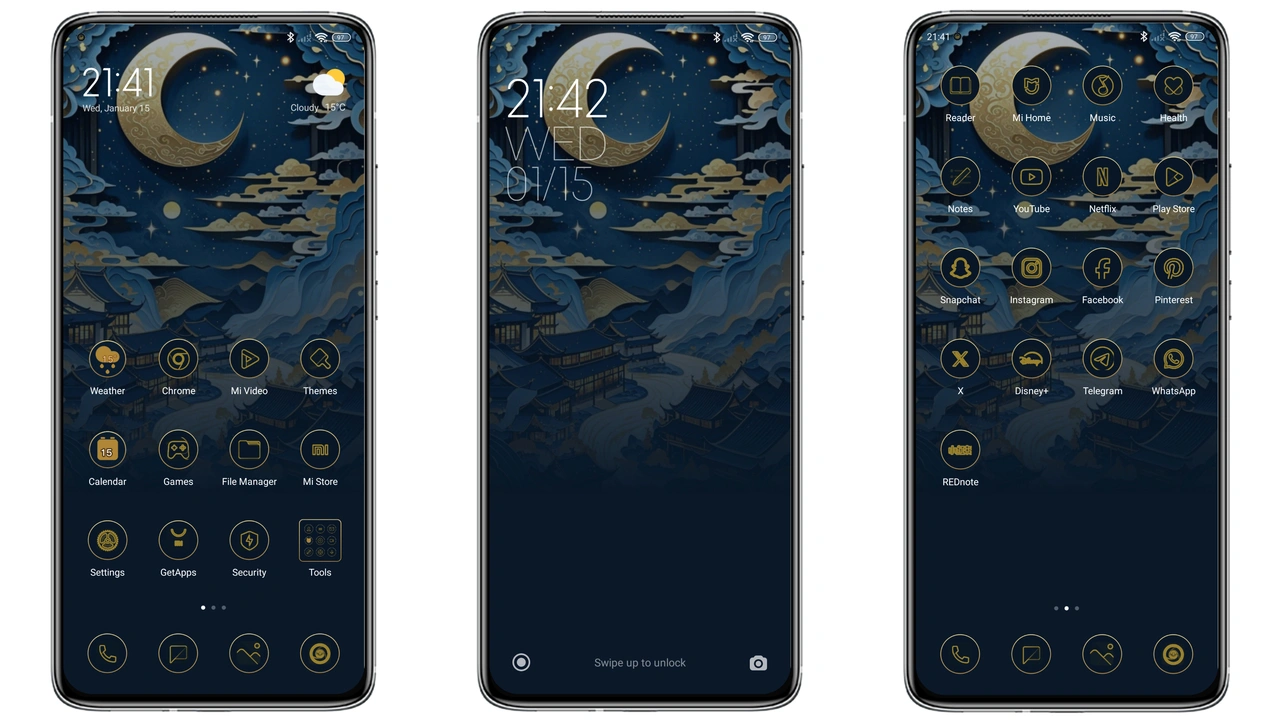
Blue theme drenches UI in calm azure. Icons adopt rounded contours, echoing modern minimalism. Wallpaper shifts to abstract moon motif, soft gradients, subtle depth. Status bar adopts thin neon accents, improving readability at a glance. Lock screen showcases a sleek silhouette, reinforcing brand identity. Always‑on display inherits low‑power blue hue, preserving battery while staying stylish. Color palette stays consistent across apps, reducing visual noise. Font weight remains unchanged, preserving system legibility. Animation speed stays native, preventing lag. Overall feel: calm, focused, contemporary.
Suggested Read: Crypto HyperOS Theme vs iOS‑Style MIUI: Which Suits Redmi & Poco?
Ideal Users and Use Cases
Fans of clean design gravitate toward this theme. Users seeking a unified look across Xiaomi, Redmi, and POCO will appreciate the consistency. Developers who test UI tweaks can use the theme as a baseline. Creators who stream videos benefit from reduced glare. Night‑owl users enjoy low‑light friendliness. Those wanting a free, high‑quality makeover without extra cost find it perfect. Community members who share themes also gain exposure by promoting a well‑crafted design.
Device Compatibility Checklist
Theme targets HyperOS 13+ on supported models. Works on Xiaomi flagship series, Redmi Note line, and POCO X series. Requires at least 2 GB RAM for smooth wallpaper transitions. No root needed; works on stock ROM and popular custom ROMs (MIUI 11‑14, Xiaomi EU). Supports both global and Chinese firmware variants. Does not interfere with system security patches. Compatible with dark mode toggles; blue accents adapt automatically. Tested on devices with 1080p and 1440p displays; scaling remains crisp.
Step‑by‑Step Install Walkthrough
1. Open browser, locate the BLUE theme page. 2. Tap the "BLUE Theme mtz File" button. 3. Save the MTZ file to device storage. 4. Launch Theme Store app. 5. Navigate to "My Themes" → "Import". 6. Select the downloaded MTZ file. 7. Confirm import, wait for processing. 8. Apply theme from the preview screen. 9. Restart device to ensure all elements load correctly. 10. Verify icons, wallpaper, lock screen, and AOD reflect the new design.
Tip: Use Firefox or the default Xiaomi browser for smoother download. Chrome may block the direct link.
Pros and Cons
• Pros
• Fresh blue aesthetic, modern feel.
• Rounded icons improve visual harmony.
• Seamless HyperOS integration, no bugs.
• Free, no DRM restrictions.
• Works on stock and custom ROMs.
• Low battery impact on AOD.
• Cons
• No alternative color variants.
• Limited to HyperOS; older MIUI versions need manual work.
• Wallpaper resolution fixed at 1080p; high‑res screens may see slight stretch.
• No built‑in font customization.
Enjoy the calm confidence of the Blue HyperOS theme and let your Xiaomi, Redmi, or POCO device stand out without effort.
Theme Preview

Download Links
Use the buttons below to open the theme file and the supporting link.
BLUE Theme mtz File
Helpful links
More Theme Updates
For more curated HyperOS and MIUI theme updates, visit Hyper OS x MIUI .


