
Personalizing stock software remains one of the primary advantages of the Xiaomi ecosystem. Blackess Pro targets users looking for a clean, cohesive hybrid interface. It blends signature iOS design cues with the modular flexibility of HyperOS, delivering functional dynamic widgets, deep dark backdrops, and refined system elements.
Parameter · Value
Designer · Masuod.B / Blackess
Size · 31.32 MB
Format · .MTZ
Compatibility · HyperOS, HyperOS 2.0, MIUI 14
Fluid Dynamic Island and Lock Screen Modular Controls
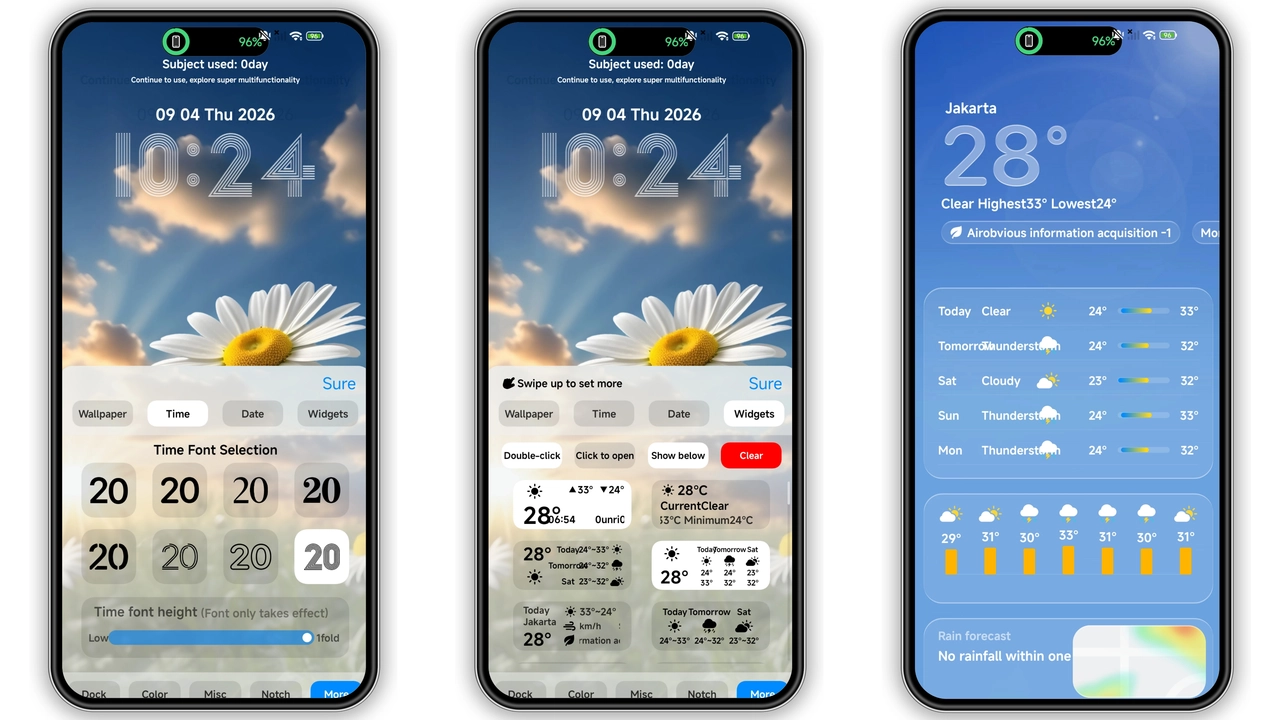
The central attraction of Blackess Pro sits right at the top of the display. The custom Dynamic Island setup smoothly expands around the camera cutout to surface live system events, media playback controls, and basic battery statistics without cluttering workspace real estate. It operates cleanly without intrusive animation lag, maintaining low resource overhead.
Customization extends across the entire lock screen. The theme provides more than eight distinct typography treatments for the clock interface, paired with customizable iOS-styled lock screen widgets. Quick toggles for essential utilities—such as flashlight activation, camera shortcut, and system search—mirror the ergonomics of modern Cupertino software while remaining deeply rooted in Xiaomi native operations.
Suggested Read: Encounter Beautiful vs Moonlit Serenity: Which Theme Wins on HyperOS & MIUI
Minimalist Dark Icon Set and Refined System Canvas
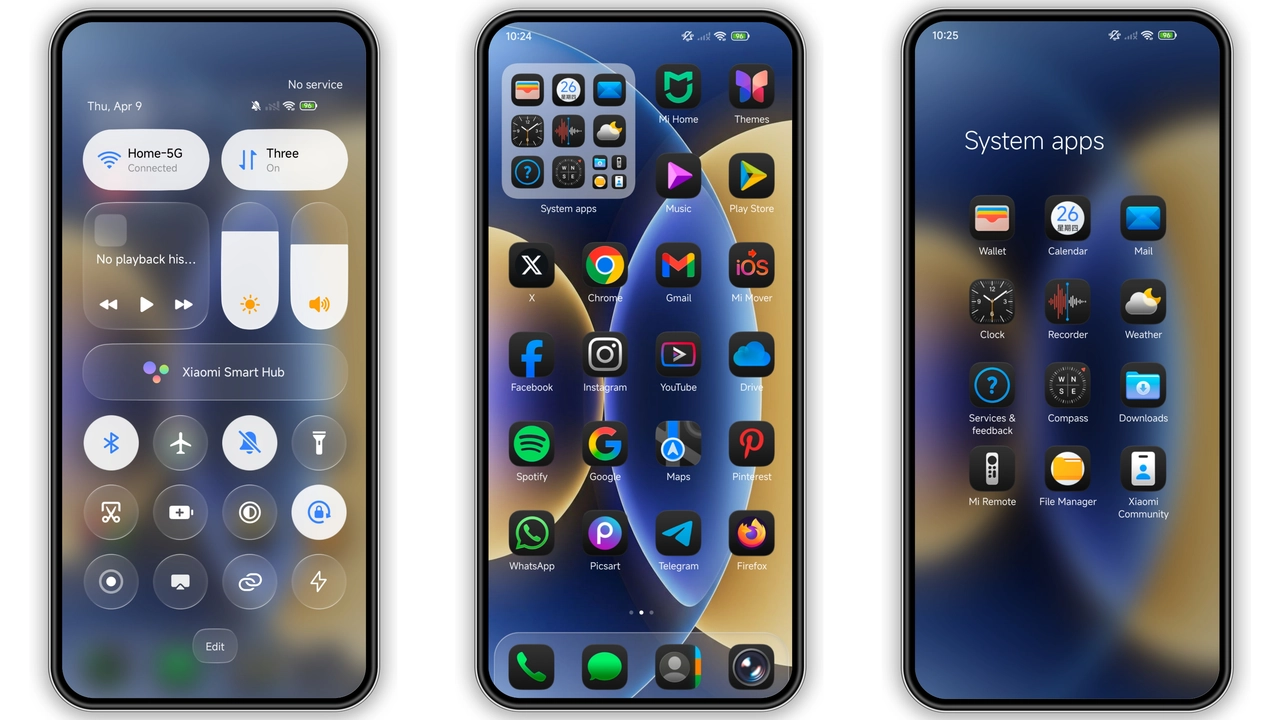
App iconography across the home screen adopts smooth rounded squircle geometry with subtle depth drop-shadows. System icons receive uniform monochrome-tinted glyphs, preventing visual discordance when scrolling through multiple app folders. Third-party software inherits custom mask wrappers to preserve edge radius consistency throughout your setup.
The desktop dock panel supports multiple style treatments, offering blurred frosted glass, semi-transparent overlays, or borderless layouts. Wallpaper choices feature dark, moody gradients optimized for AMOLED panels, minimizing ambient battery draw during everyday navigation.
Deep Subsystem Integration and UI Accents
Unlike superficial theme overlays, Blackess Pro skins core interactive interfaces. The HyperOS Control Center receives modified quick setting toggles featuring frosted highlights, improved slider tracks for brightness and volume, and customized connectivity emblems.
Inside native system utilities—including the dialer, SMS messaging canvas, and settings menu—clean typography pairs with high-contrast dividing lines. The status bar displays modified battery icons, redesigned signal bars, and a clean Wi-Fi indicator, unifying system presentation from top to bottom.
Device Compatibility and Installation Overview
Blackess Pro works across Xiaomi, Redmi, and POCO handsets running HyperOS, HyperOS 2.0, or MIUI 14. Due to system-level differences between stock global releases and unlocked custom software variants, installation methods differ slightly:
• Custom ROMs (Xiaomi.eu, Elite, etc.): Direct .MTZ installation works natively via the built-in Theme Store import panel without regional restrictions.
• Official Global / EEA Stable ROMs: Direct local third-party MTZ loading may require third-party packaging utilities or developer authorization depending on your active patch version.
System Recommendation: Reboot your handset immediately after theme application. This clears existing layout caches and eliminates graphical overlaps in the notification shade and navigation bar.
Pros and Cons
• Pros:
• Functional Dynamic Island implementation with fluid response.
• Deep lock screen flexibility featuring over 8 typography presets.
• True black AMOLED optimization reduces panel power consumption.
• Comprehensive styling covering Control Center, Status Bar, and native system apps.
• Cons:
• Third-party MTZ loading on locked Global stock ROMs requires workaround steps.
• Aggressive dark UI mode might reduce contrast in bright daylight environments.
Theme Preview
Download Links
Use the buttons below to open the theme file and the supporting link.
Blackess Theme mtz File
Helpful links
More Theme Updates
For more curated HyperOS and MIUI theme updates, visit Hyper OS x MIUI .


