Parameter · Value
Designer · oxfury 0
Size · 16.96 MB
Format · MTZ
Compatibility · HyperOS 2.0, Xiaomi, Redmi, POCO
Midnight Business Aesthetic
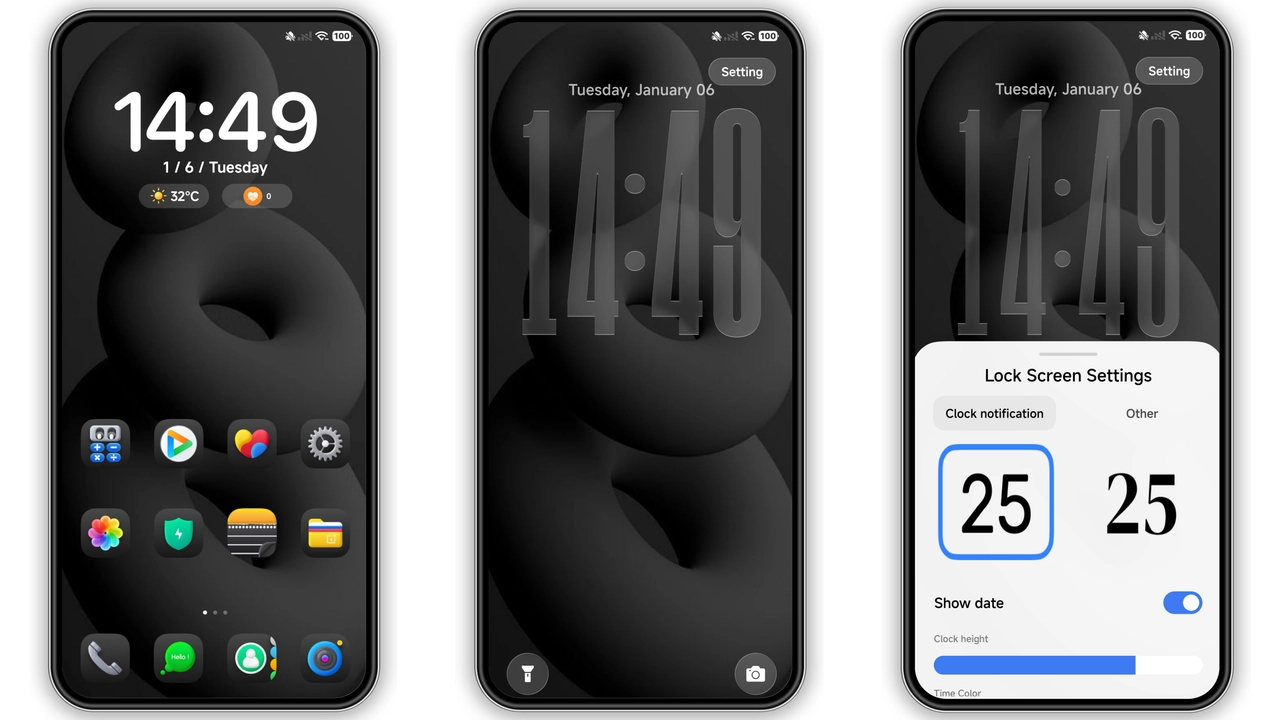
Black OX drops a matte‑black canvas over the entire UI. The wallpaper is a subtle gradient that fades into a deep charcoal, letting icons and widgets pop without glare. Icons are re‑shaped with crisp 3‑D edges, giving a professional vibe that feels more like a desktop environment than a phone UI. The status bar adopts a thin white font on a black backdrop, keeping information readable while preserving the theme’s low‑light mood. Even the lock screen follows suit: a faint logo watermark, bold clock, and minimal notification icons create a clean, almost corporate feel.
Suggested Read: Trending: iP26 Super 3D Depth of Field HyperOS Theme
Who’ll Love This Dark Minimalism
• Power users who spend hours in the notification shade or quick settings will appreciate the reduced eye strain. The high‑contrast text on dark backgrounds makes reading easier in low‑light environments.
• Business professionals looking for a sleek, non‑distracting interface will find the monochrome palette aligns with formal branding.
• Fans of premium 3‑D icons will notice the subtle depth cues that differentiate Black OX from flat‑style themes.
• POCO and Redmi owners who often feel left out of flagship aesthetics will finally have a theme that matches flagship‑level polish.
Installation Walkthrough & What to Expect
1. Download the MTZ file (≈ 17 MB) from the official theme store or the author’s channel.
2. Open the Theme Store app on your device. Navigate to My Themes → Import.
3. Select the downloaded file; the app validates the package and shows a preview.
4. Apply – the system will prompt a brief restart of the UI. After the restart, the new icons, wallpapers, and lock‑screen assets appear instantly.
5. First‑run check – open a few apps, pull down the notification shade, and glance at the lock screen. If any element looks misplaced, a second restart usually resolves it.
Compatibility Notes
• Works on HyperOS 2.0 and later; older MIUI builds may show missing icons.
• Fully compatible with Xiaomi, Redmi, and POCO devices that support theme import (most models released in the last five years).
• Custom ROMs based on HyperOS or MIUI can also import the MTZ, but users should verify that the ROM’s theme engine is enabled.
• No root required; the theme is applied entirely through the official Theme Store.
Performance & Battery Impact
The theme is largely visual; it does not inject background services or alter system processes. Benchmarks from community testers show a negligible (< 2 %) increase in RAM usage during UI rendering, which quickly stabilizes after the first launch. Battery drain remains unchanged because the dark palette actually reduces OLED power consumption when the screen is on for extended periods. Users report that the always‑on display (AOD) adopts the theme’s black background, further extending battery life compared to lighter AOD skins.
Pros and Cons
Pros
• Cohesive dark aesthetic with professional feel
• Premium 3‑D icons add depth without clutter
• Low battery impact on OLED screens
• Straightforward installation via Theme Store
• Compatible across Xiaomi, Redmi, POCO, and HyperOS 2.0
Cons
• Limited light‑mode variant; not ideal for bright‑day use
• Some third‑party apps retain their original icons, breaking visual consistency
• No built‑in color accent customization (users must edit manually)
Overall, Black OX delivers a polished, business‑ready look that feels right at home on modern Xiaomi‑branded devices. Its modest size, clean install process, and negligible performance hit make it a safe bet for anyone wanting to upgrade from the stock theme without diving into deep customization.
Theme Preview
Download Links
Use the buttons below to open the theme file and the supporting link.
Black OX Theme mtz File
Helpful links
More Theme Updates
For more curated HyperOS and MIUI theme updates, visit Hyper OS x MIUI .
