Parameter · Value
Designer · BoZinsky
Size · 24.24 MB
Format · MTZ
Compatibility · HyperOS / MIUI
Midnight Cyber‑Sharp Visuals
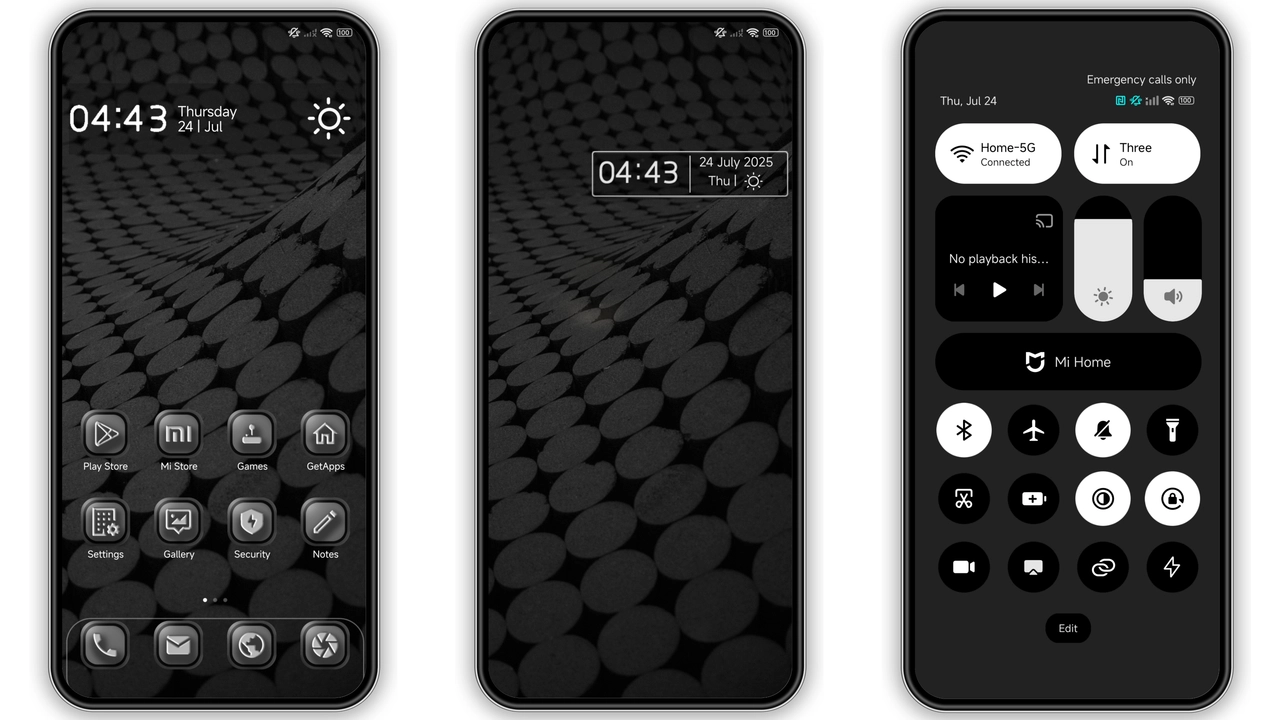
Black Hype throws a full‑black canvas over the system UI, then layers a muted gray accent that never feels harsh. Icons receive a subtle 3‑D extrusion, giving depth without inflating the visual noise. Rounded corners are trimmed to a demi‑square silhouette, striking a balance between modern minimalism and the classic MIUI curve. The lock screen adopts a high‑contrast wallpaper that mirrors the theme’s chrome‑like texture, while the Always‑On Display flips to a monochrome clock that glows faintly against the darkness. Status bar icons adopt the same gray tone, making notifications readable yet unobtrusive. Overall, the visual language feels corporate‑cool, perfect for users who prefer a professional aesthetic over neon‑filled custom skins.
Suggested Read: Archive Spotlight: Autumn Tale Cat MTZ Theme for HyperOS & MIUI
Ideal Users: Power‑Users & Night‑Owls
If you spend evenings scrolling, coding, or gaming, the low‑light palette reduces eye strain. Professionals who need a distraction‑free workspace will appreciate the muted tones that keep focus on content rather than chrome. The 3‑D icon treatment also appeals to enthusiasts who enjoy a touch of depth without committing to full‑blown animated themes. Conversely, users who love pastel palettes or heavy gradients may find the stark contrast too severe. The theme’s business‑oriented vibe makes it a solid choice for corporate devices, but it also works on personal phones for anyone who wants a sleek, no‑frills look.
Installation Walkthrough & Gotchas
1. Download the MTZ file from the provided link. The package is 24 MB, so a stable Wi‑Fi connection is recommended.
2. Open the Theme Store app on your HyperOS or MIUI device.
3. Tap “Import” at the bottom of the Themes section.
4. Navigate to the downloaded MTZ, select it, and confirm the import.
5. Apply the theme from the preview screen.
6. Restart the phone to ensure the lock screen and AOD refresh correctly.
Gotchas: The theme disables advanced texture and window transparency for optimal control‑center performance. If you have those features enabled, the UI may appear glitchy until you turn them off in Settings → Display → Advanced. Some custom ROMs (e.g., Xiaomi EU) may require a manual cache clear after applying the theme. Finally, older MIUI builds may not render the 3‑D icons perfectly; a quick reboot usually resolves minor artifacts.
Performance & Battery Impact
Because Black Hype leans heavily on flat colors and disables translucency, GPU load drops compared with richer themes that use animated wallpapers. Users report a marginal battery gain of 2‑3 % during typical day‑long use. The 3‑D icon rendering does add a tiny processing step, but it’s negligible on modern Snapdragon chipsets. Memory consumption stays under 150 MB, leaving ample headroom for apps. In short, the theme is lightweight, fast, and friendly to battery life.
Pros and Cons
• Pros
• Elegant black‑and‑gray palette reduces eye strain.
• 3‑D icons add depth without heavy animation.
• Low GPU usage improves battery life.
• Professional look fits business environments.
• Cons
• Disables advanced texture; users may miss translucency.
• Very dark; not ideal for bright‑day outdoor use.
• Slight icon rendering quirks on older MIUI versions.
• No built‑in pastel or vibrant color options.
Theme Preview


Download Links
Use the buttons below to open the theme file and the supporting link.
Black Hype Theme mtz File
Helpful links
More Theme Updates
For more curated HyperOS and MIUI theme updates, visit Hyper OS x MIUI .


