Parameter · Value
Designer · moscreen
Size · 15.28 MB
Format · .mtz (MIUI Theme Package)
Compatibility · HyperOS, MIUI 12‑14 (Xiaomi, Redmi, POCO)
Cosmic Dark Palette with Vibrant Accents
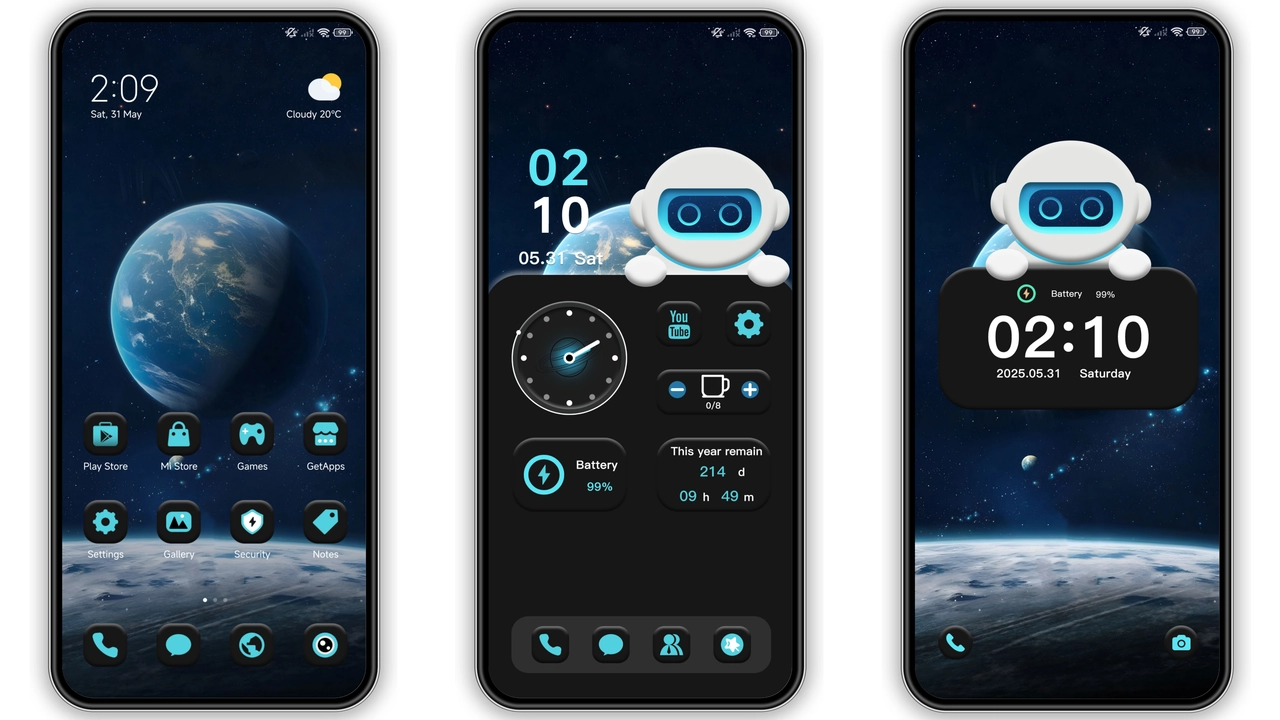
The theme drapes the system UI in a deep, star‑less black that feels like the void of space. Over that, electric blues and subtle earth tones punctuate status icons, navigation bars, and quick‑settings toggles. The contrast is sharp enough for outdoor readability yet soft enough for night‑mode comfort. Background wallpapers showcase high‑resolution shots of nebulae, satellite silhouettes, and a stylized astronaut helmet that mirrors the theme’s name.
Suggested Read: Lucky Cat Chime MTZ Theme for Redmi Note Series
Dynamic Lock Screen that Reacts to Touch
A single tap on the lock screen toggles between three astronaut expressions—curious, heroic, and relaxed. The lock screen also animates a subtle orbiting ring when you swipe, reinforcing the space motif without draining the battery. The unlock method stays standard (slide‑to‑unlock), so there’s no learning curve for existing users. The animation runs at 60 fps on supported devices, delivering a buttery experience.
Space‑Inspired Icon Set and Wallpapers
Every system app receives a custom icon that echoes the astronaut aesthetic: rounded, slightly glossy, with a faint halo effect. Messaging, camera, and settings icons adopt a blue‑green gradient that matches the status bar accents. The theme includes three optional wallpaper packs—Nebula, Moon Surface, and Satellite View—allowing you to swap the backdrop without leaving the theme. All assets are optimized for 1080p and 1440p displays, preserving crispness on flagship devices.
Seamless Integration with HyperOS and MIUI
Moscreen designed the theme to work natively on both HyperOS and MIUI, covering versions 12 through 14. The theme auto‑detects the underlying OS and adjusts the lock‑screen animation timing to match the system scheduler, preventing stutter. Installation follows the standard MTZ import process: download the file, open the Themes app, tap Import, then Apply. After applying, a quick reboot clears residual caches, guaranteeing that icons, fonts, and animations render correctly.
Who Will Love This Theme?
• Space enthusiasts—the cosmic visuals and astronaut motifs hit the mark.
• Power users—the theme’s low‑size footprint (15 MB) leaves ample storage for apps and games.
• Night‑mode fans—the dark palette reduces OLED burn‑in while keeping readability high.
• Xiaomi/Redmi owners—full support for MIUI 12‑14 and HyperOS means no compromises.
• Customization hobbyists—the three wallpaper packs and expression toggles add a playful layer of personalization.
Installation Expectations and Practical Tips
1. Download the .mtz file from the official Xiaomi Theme Store or the provided download link.
2. Open the Themes app, tap the three‑dot menu, select Import, and locate the file.
3. Apply the theme; the system prompts a brief restart to finalize.
4. After reboot, verify that the lock‑screen animation runs smoothly; if it appears frozen, clear the Theme cache in Settings → Apps → Themes.
5. Switch wallpapers from the theme’s settings page; changes apply instantly without a reboot.
Pros and Cons
• Pros
• Stunning space visuals, high‑resolution wallpapers.
• Dynamic lock‑screen expressions add personality.
• Lightweight (15 MB) leaves room for other assets.
• Full compatibility with HyperOS and MIUI 12‑14.
• Free to download and use.
• Cons
• Limited to Xiaomi, Redmi, POCO devices; no support for non‑MIUI phones.
• Dynamic lock screen may slightly increase battery draw on older hardware.
• No built‑in dark‑mode toggle; theme assumes system dark mode.
Enjoy a celestial UI overhaul without sacrificing performance. The Astronaut Mimicry theme proves that a well‑crafted MIUI package can feel fresh, modern, and uniquely personal—all for free.
Theme Preview

Download Links
Use the buttons below to open the theme file and the supporting link.
Astronaut mimicry Theme mtz File
Helpful links
More Theme Updates
For more curated HyperOS and MIUI theme updates, visit Hyper OS x MIUI .


