Parameter · Value
Designer · SabriTN
Size · 49.4 MB
Format · MTZ
Compatibility · HyperOS / MIUI
Neon‑Lit Streetscape Visuals
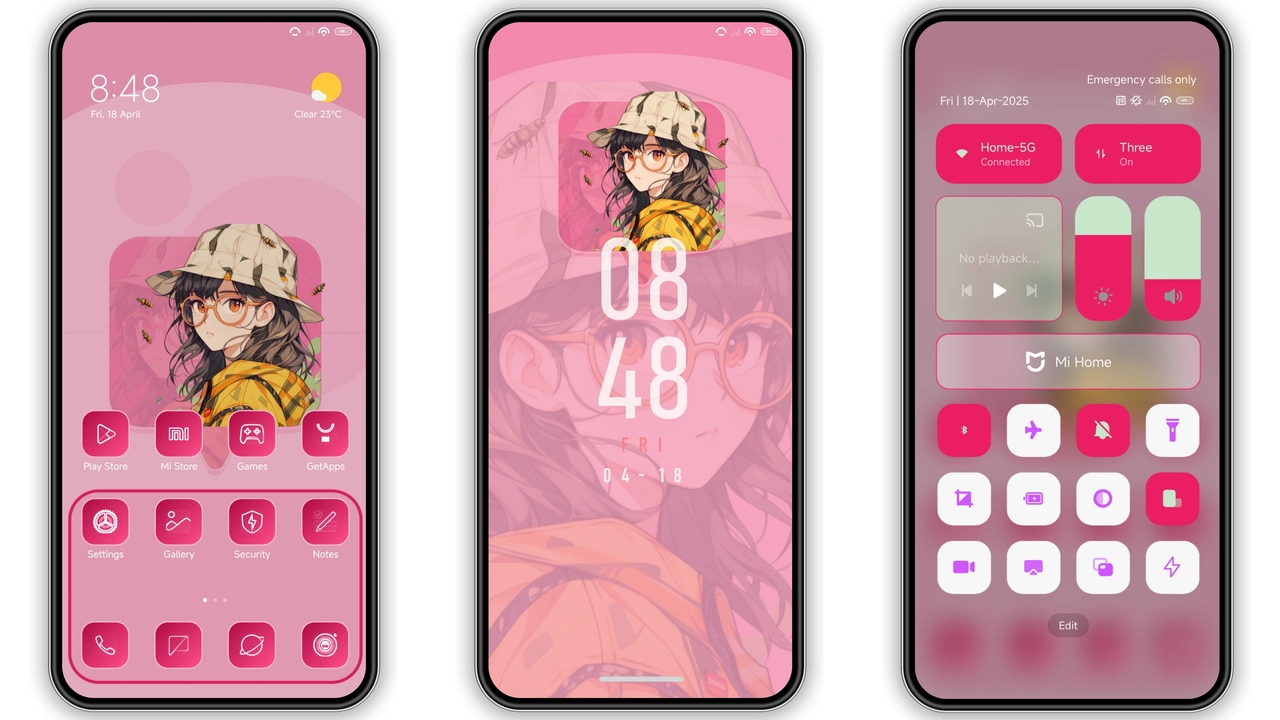
Neon palette dominates. Dark background, bright accents. Icons adopt glossy, slightly rounded silhouette. Wallpapers feature city lights, depth blur. UI elements receive subtle glow, reinforcing night‑city vibe.
Suggested Read: How to Install Siuuu HyperOS Theme with Transparent Icons on Redmi Phones
iOS‑Inspired Lock Screen Experience
Lock screen swaps MIUI default for iOS‑style layout. Time centered, date stacked, swipe gestures mimic iOS. Notification bubbles retain HyperOS animation but sit within iOS frame. Result: familiar Apple feel on Android base.
Ideal Users & Use Cases
Night‑owl gamers craving immersive UI. Minimalist fans who still want a pop of color. Users migrating from iOS seeking visual continuity. Anyone wanting a fresh look without rooting.
Installation Walkthrough & Tips
1. Open Theme Store, tap “Official Theme Store Link”.
2. Locate Streetlight, hit Download.
3. Apply, restart if UI glitches appear.
4. Custom ROM users: download MTZ, open Theme Store → Import → select file → apply.
5. After apply, clear cache if icons misalign.
Pros and Cons
Pros
• Cohesive neon aesthetic.
• iOS lock screen adds novelty.
• Compatible with global HyperOS builds.
• Light on resources, 49 MB size.
Cons
• No dark‑mode toggle; always neon.
• Icons may clash with non‑themed wallpapers.
• Limited widget redesign.
• Requires Theme Store for smooth install.
Theme Preview


Download Links
Use the buttons below to open the theme file and the supporting link.
Download Streetlight MTZ File
Helpful links
More Theme Updates
For more curated HyperOS and MIUI theme updates, visit Hyper OS x MIUI .