Parameter · Value
Designer · —
Size · 10.4 MB
Format · MTZ
Compatibility · HyperOS / MIUI
Glass‑Smooth Visual Language
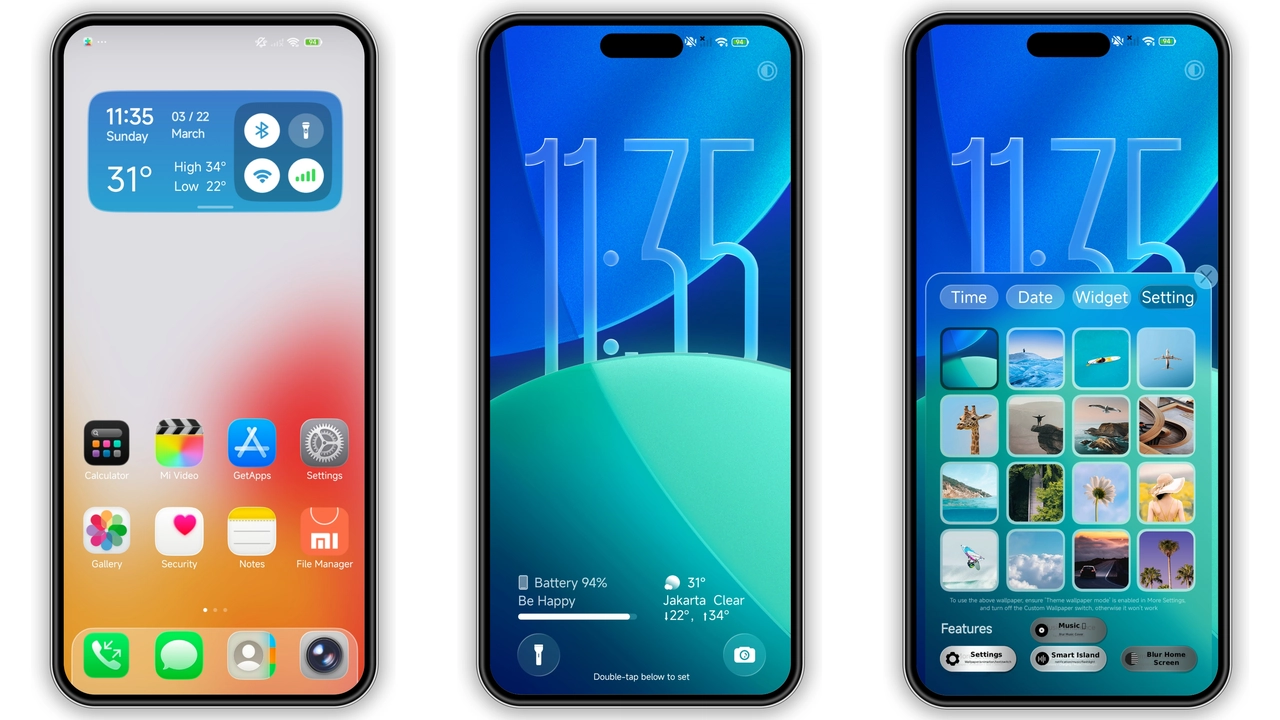
Poo‑Glass adopts a translucent glass aesthetic. Backgrounds shimmer with subtle frosted blur. Icons receive a glossy finish that catches light. System fonts stay unchanged, preserving readability. Color palette leans toward cool blues and soft whites. Dark mode retains the glass effect with muted opacity. Lock screen inherits the same frosted overlay. Wallpaper integration feels natural, not forced. Overall UI feels airy, modern, and less cluttered. The theme respects original layout while adding visual depth. Animations stay smooth, no jitter. Transition delays are minimal, keeping interaction snappy.
Suggested Read: Crypto HyperOS Theme vs iOS‑Style MIUI: Which Suits Redmi & Poco?
Control‑Centre Toggles: Quick Access Design
Four toggles sit in the Control Centre. Each toggle features a minimalist icon inside a glass button. Toggle one controls Wi‑Fi. Toggle two manages Bluetooth. Toggle three activates flashlight. Toggle four switches Dark Mode. Icons change colour when active, providing instant feedback. Placement mirrors stock layout, reducing learning curve. Glass background behind toggles matches overall theme. Touch response is immediate, no lag. Users can reorder toggles in settings, though default order works for most. The design balances functionality with aesthetics.
Ideal Users & Device Fit
Fans of minimalist design gravitate to Poo‑Glass. Users who enjoy iOS‑like translucency find it familiar. Early adopters of HyperOS appreciate native compatibility. Redmi and Xiaomi flagship owners notice the most polish. Devices with AMOLED displays showcase the glass effect best. Users with lower‑end LCD panels still benefit, though depth appears less pronounced. The theme suits those who want a fresh look without overhauling UI logic. Developers looking for a clean base for further customization can start here. Community members seeking a theme with functional toggles will appreciate the added shortcuts.
Installation Steps & What to Expect
Download the MTZ file from the official theme store. Open the Themes app. Tap Import and locate the MTZ file. Confirm import; the theme appears in the list. Select the theme and apply. System prompts a reboot if UI elements overlap. Reboot resolves any visual glitches. After reboot, verify that toggles appear in the Control Centre. Test each toggle for proper function. If a toggle fails, clear cache of the Themes app and reapply. Expect a slight increase in memory usage due to additional assets, but impact remains negligible. Battery consumption stays comparable to stock UI.
Pros and Cons
Pros
• Glassy visual upgrade
• Four functional toggles
• Seamless HyperOS / MIUI compatibility
• Light memory footprint
• Easy installation via MTZ
Cons
• No custom font option
• Limited colour customization
• Glass effect less pronounced on low‑end screens
• Requires reboot for first‑time apply
Overall, Poo‑Glass delivers a polished, glass‑styled UI with practical shortcuts. It fits well on modern Xiaomi devices and respects system performance. Users seeking a fresh look without sacrificing stability will find it a strong choice.
Theme Preview


Download Links
Use the buttons below to open the theme file and the supporting link.
Download Poo-Glass MTZ File
Helpful links
More Theme Updates
For more curated HyperOS and MIUI theme updates, visit Hyper OS x MIUI .