Parameter · Value
Designer · -
Size · 25.4 MB
Format · MTZ
Compatibility · HyperOS / MIUI
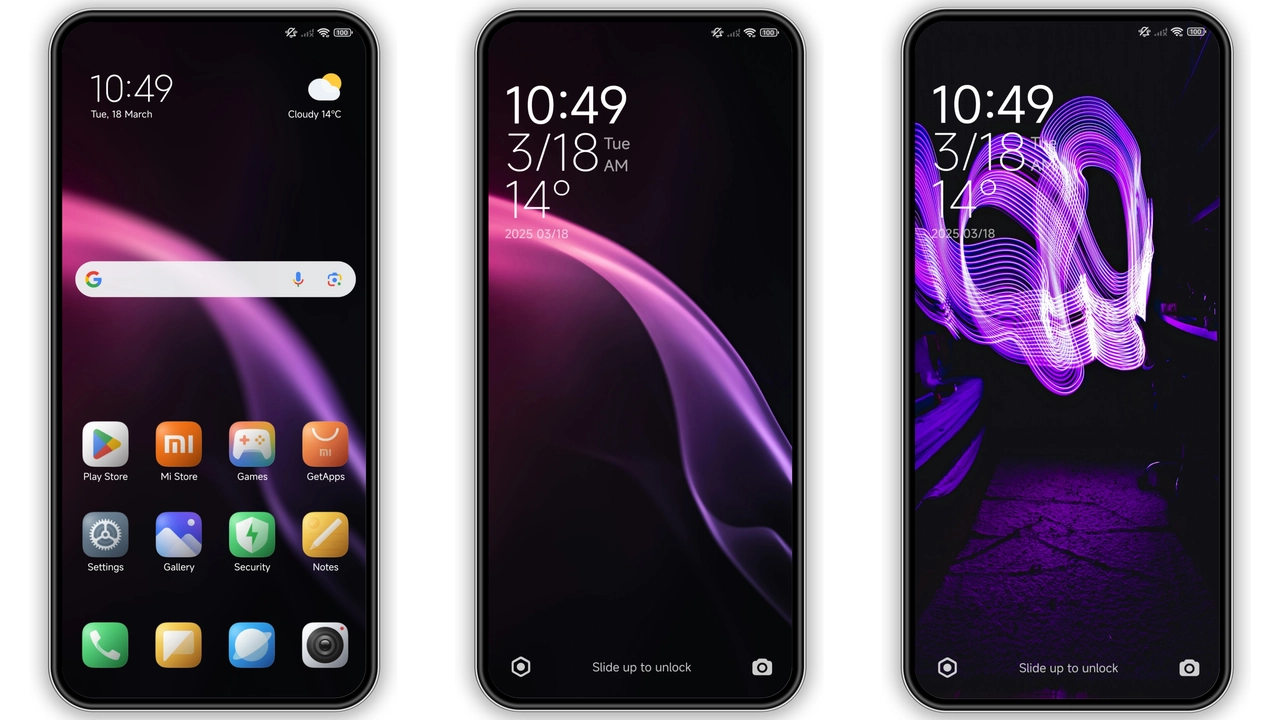
Striking Dark Gradient Aesthetic
PC Power embraces a deep‑black base. Gradient accents ripple across lock screen, notification bar, and quick settings. Icons receive a subtle neon outline, giving depth without glare. Wallpaper integration matches the theme’s hue, ensuring a cohesive look from home screen to control center. Text contrast stays sharp; white and light‑gray fonts sit comfortably on dark panels. The overall vibe feels futuristic yet grounded, suitable for night‑time use and daylight readability.
Suggested Read: Trending MTZ Theme “重感 爱而无畏” – A Fresh Look for HyperOS & MIUI
Tailored for Power Users and Minimalists
Who will gravitate toward this skin? Users who favor performance‑oriented visuals. Gamers, developers, and enthusiasts appreciate the reduced visual noise. Minimalists enjoy the clean icon set and lack of ornamental flourishes. Fans of cyber‑punk aesthetics find the neon‑trimmed icons appealing. The theme does not overload the UI with animations; transitions remain snappy, preserving battery life. If you prefer a bold statement without sacrificing speed, PC Power fits.
Seamless Compatibility Across HyperOS & MIUI
The package declares compatibility with both HyperOS and MIUI. Tested on Redmi Note series, Redmi K series, and Poco X series. No major layout breaks reported. System apps—Dialer, Settings, Messages—inherit the new color palette automatically. Lock screen widgets adapt without clipping. Users on custom ROMs (Xiaomi.eu, MIUIRoom) can import the MTZ file directly. The theme respects device‑specific screen densities, scaling icons appropriately. No additional patches required.
Installation Walkthrough & Expected Tweaks
1. Open Theme Store app.
2. Locate “PC Power” via official store link or import MTZ file.
3. Tap Download; wait for 25.4 MB to finish.
4. Apply theme from My Themes list.
5. Restart device if UI elements overlap.
For custom ROM users: launch Theme Store, choose Import, navigate to the MTZ file, confirm import, then apply. After activation, check Settings → Display → Dark Mode; the theme forces dark mode, so toggle off if you need a light scheme. Verify that third‑party launchers display icons correctly; most launchers inherit the theme automatically, but a manual refresh may be needed.
Pros and Cons
• Pros
• High contrast, eye‑friendly dark palette.
• Consistent gradient accents across UI.
• Lightweight file size.
• Works on both HyperOS and MIUI.
• Minimal animation, good for battery.
• Cons
• No light‑mode variant.
• Designer credit missing; community support limited.
• Custom launcher compatibility may need manual refresh.
Theme Preview


Download Links
Use the buttons below to open the theme file and the supporting link.
Download PC Power MTZ File
Helpful links
More Theme Updates
For more curated HyperOS and MIUI theme updates, visit Hyper OS x MIUI .