Parameter · Value
Designer · OXFURY
Size · 86.22 MB
Format · MTZ
Compatibility · HyperOS, HyperOS 2.0, HyperOS 3.0, MIUI
Bursting Color Palette that Pops
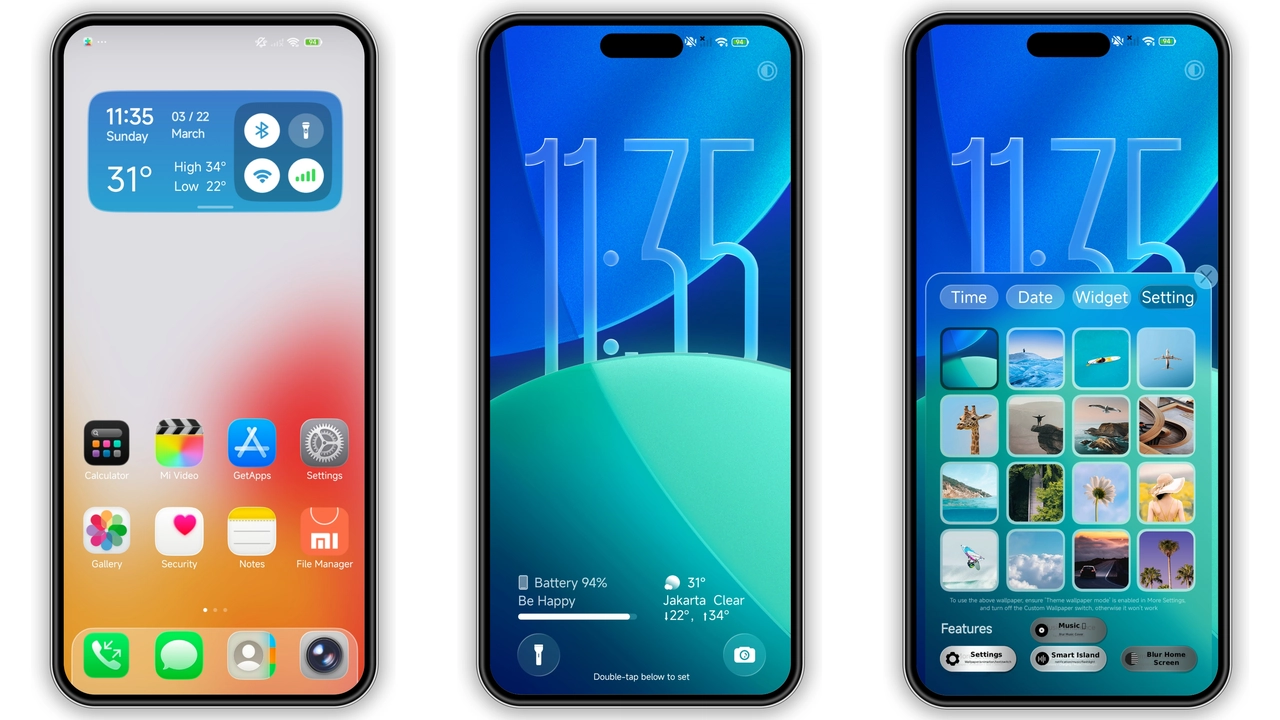
MS M1 throws a kaleidoscope onto every screen element. Icons receive fresh gradients, status bar accents shift to match the dominant hue of the current wallpaper, and the notification shade glows with a subtle neon edge. The palette leans toward saturated blues, electric pinks and vivid greens, yet each shade is balanced by a dark‑mode base that keeps battery drain low. The result feels like a living, breathing UI rather than a static skin.
Suggested Read: Cute Shiba Inu MTZ Theme Trending on HyperOS & MIUI
Dynamic Lock Screen & Always‑On Display
The lock screen is the centerpiece. A high‑resolution wallpaper slides in sync with the time widget, while the unlock swipe reveals a secondary animation that mirrors the chosen accent color. Always‑On Display inherits the same color logic, showing the clock in bold type with a faint background blur. Users can toggle between a minimal clock, a calendar preview, or a weather widget without leaving the theme settings. The lock‑screen transition feels smooth, thanks to HyperOS’s native animation framework.
Tailored for Power Users and Visual Enthusiasts
If you spend hours tweaking UI tweaks, MS M1 answers the call. Every icon pack component is individually editable through HyperOS’s theme editor, allowing you to replace a single app icon while preserving the overall aesthetic. The theme also supports custom accent overrides, so you can lock the accent to a single color if you prefer a more uniform look. Power users will appreciate the inclusion of extra wallpaper packs—each designed to complement the icon set and maintain visual harmony across the home screen, lock screen and AOD.
Installation Walkthrough & What to Expect
1. Download the MTZ file from the official theme page.
2. Open the Theme Store app, tap Import, and select the downloaded file.
3. Apply the theme; the system will prompt a quick reboot.
4. After reboot, verify that icons, wallpapers and lock‑screen elements have swapped.
5. If any element appears misaligned, clear the theme cache in Settings → Themes → Manage → Clear Cache, then re‑apply.
The installation process takes under two minutes on a typical device. Because the theme touches the lock screen and AOD, a restart ensures that the new resources load correctly. Users report no performance lag; the theme leverages HyperOS’s optimized rendering pipeline, so animation frames stay at 60 fps even on mid‑range hardware.
Pros and Cons
Pros
• Vivid, cohesive color scheme that energizes the UI.
• Fully customizable icons and accent colors.
• Rich lock‑screen and AOD animations.
• Compatible with HyperOS 2.0 and 3.0 as well as MIUI.
• Lightweight for a feature‑rich theme (under 90 MB).
Cons
• Bright palette may not suit users who prefer muted tones.
• Requires a restart after applying; some users find this inconvenient.
• No built‑in dark‑mode toggle for the lock screen; you must switch the whole theme.
• Limited to devices that support MTZ import (stock HyperOS/MIUI only).
Theme Preview


Download Links
Use the buttons below to open the theme file and the supporting link.
MS M1 Theme mtz File
Helpful links
More Theme Updates
For more curated HyperOS and MIUI theme updates, visit Hyper OS x MIUI .