Parameter · Value
Designer · V‑ry Design
Size · 12.07 MB
Format · .mtz
Compatibility · HyperOS / MIUI (Xiaomi, Redmi, POCO)
Neon‑Pink Anime Visuals That Pop
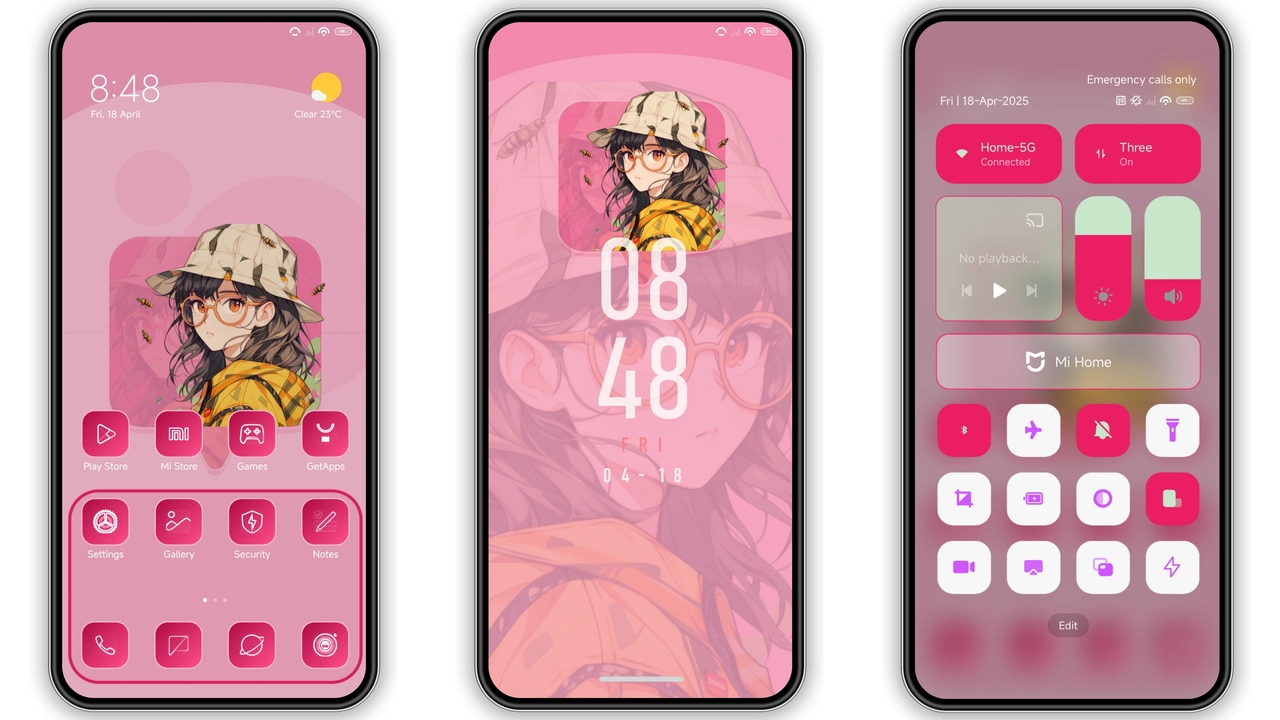
The Hyper Anime theme throws a splash of candy‑pink across every corner of the UI. Icons are redrawn in a clean, anime‑inspired silhouette, each stroke hinting at a stylized character silhouette. The wallpaper set features high‑contrast anime artwork: bold hair, glowing eyes, and a kinetic sense of motion that makes the lock screen feel like a scene straight out of a shōjo series. The status bar adopts a translucent pink glow, while the navigation bar uses a subtle gradient that fades into the background, keeping the focus on the icons.
Suggested Read: Archive Entry: OX F1 HyperOS Theme – Detailed Look for Xiaomi & Redmi
Who’ll Love This Kawaii‑Heavy Design
If you spend your free time scrolling through anime forums, collecting figurines, or customizing your phone with pastel‑colored accessories, this theme will feel like a natural extension of your aesthetic. It also appeals to users who enjoy a cohesive visual language—every element, from the lock screen clock to the Always‑On Display (AOD), follows the same pink‑anime motif. The theme is light‑mode only, so it works best for users who prefer bright, uplifting palettes over dark schemes. Minimalists may find the vivid colors overwhelming, but anyone craving a bold, character‑driven makeover will appreciate the attention to detail.
Compatibility Checklist for HyperOS & MIUI
Hyper Anime targets devices running HyperOS or MIUI, covering the flagship Xiaomi line, Redmi budget series, and POCO devices that share the same firmware base. The theme’s .mtz package is recognized by the native Theme Store app, meaning no third‑party launchers are required. It supports the standard screen resolutions found on most recent Xiaomi phones; on devices with unusually tall aspect ratios, the lock‑screen wallpaper may crop slightly, but the core UI elements remain intact. Because the theme is light‑mode only, ensure your system theme is set to Light before applying; otherwise the icons will appear washed out.
Installation Walkthrough & Download Tips
1. Open the Theme Store app (pre‑installed on all HyperOS/MIUI devices).
2. Tap the three‑dot menu → Import → locate the downloaded Hyper Anime.mtz file.
3. Select the file, confirm the import, and wait for the preview to load.
4. Press Apply.
5. Reboot the phone to let the new wallpapers and lock‑screen assets settle.
Download notes: The file size is modest (just over 12 MB), so even a 3G connection handles it quickly. Store the .mtz in the device’s internal storage rather than an SD card to avoid permission hiccups during import. After applying, a quick restart clears any leftover UI remnants and guarantees that the AOD displays the new pink gradient correctly.
Pros and Cons
• Pros
• Cohesive pink‑anime aesthetic across icons, lock screen, AOD, and wallpapers.
• Light‑mode only ensures colors stay vibrant and true to the designer’s vision.
• Small file size; quick download and install.
• Native .mtz format works seamlessly with the built‑in Theme Store.
• Cons
• No dark‑mode variant; users preferring dark UI must switch back manually.
• Slight wallpaper cropping on ultra‑tall displays.
• Limited to HyperOS/MIUI; not compatible with third‑party launchers.
Overall, Hyper Anime delivers a polished, character‑driven makeover that feels tailor‑made for anime enthusiasts who love a splash of pink on their daily device.
Theme Preview


Download Links
Use the buttons below to open the theme file and the supporting link.
Hyper Anime Theme mtz File
Helpful links
More Theme Updates
For more curated HyperOS and MIUI theme updates, visit Hyper OS x MIUI .


