Theme Metadata
Parameter · Value
Designer · -
Size · 28.77 MB
Format · MTZ, ZIP
Compatibility · HyperOS 2.0, Xiaomi, Redmi, POCO devices
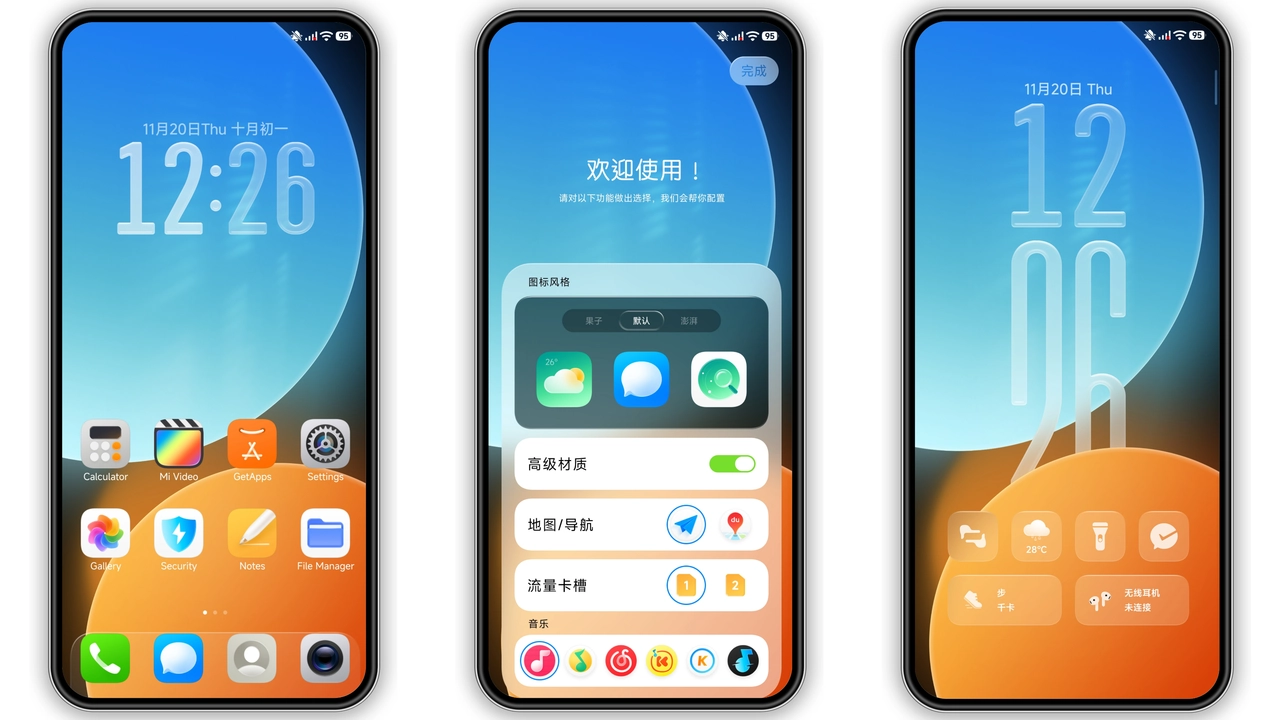
Bold Blue Canvas Look
Theme swaps icons for bright blue glyphs. Icons adopt flat geometry for instant recognition. Color palette stays within cool blues, teal accents, white highlights. Status bar inherits matching hue, improving readability. Lock screen animates subtle gradient, adding depth without distraction. Always‑on display mirrors canvas colors, ensuring consistency even on standby.
Suggested Read: How to Install Cute Baking Hut Theme on HyperOS & MIUI
Dynamic Lock Screen Refresh
Lock screen features animated wallpaper cycle. Cycle pulls from bundled high‑resolution images. Animation runs smoothly on HyperOS 2.0, no lag observed. Users can pause cycle via lock screen settings. Dynamic lock screen reduces static feel, adds daily visual surprise. Battery impact negligible; theme leverages native HyperOS animation engine.
Fresh Wallpaper Cycle
Wallpaper set includes six curated images. Images reflect modern abstract art, city skylines, nature silhouettes. Wallpaper changes automatically after each reboot, offering variety. Users may manually select any image from theme package. Images sized for full‑HD and higher displays, no stretching. Compression optimized for quick load, preserving detail.
Compatibility & Installation Expectations
Theme declares compatibility with HyperOS 2.0 and MIUI 14. Works on Xiaomi, Redmi, POCO models supporting HyperOS. Installation requires Theme Store app or direct MTZ import. Users on stock ROM open Theme Store, import MTZ, apply, restart. Custom ROM users import via Theme Store → Import → select MTZ. Restart recommended to clear overlay artifacts. No root needed. Theme size modest; download completes quickly on typical mobile data. No additional permissions requested beyond theme application.
Pros and Cons
• Pros
• Vibrant blue aesthetic, fresh look
• Dynamic lock screen, rotating wallpapers
• Low resource usage, smooth performance
• Simple install, no root required
• Compatible across Xiaomi, Redmi, POCO
• Cons
• Designer unknown, no official support channel
• Limited color options; blue‑centric only
• No built‑in dark mode toggle
• Backup ZIP large, may need extra storage
Conclusion: Free Canvas delivers a cohesive blue theme for HyperOS users. Minimal install steps, consistent visuals, dynamic lock screen make it a solid free option. Ideal for fans seeking a fresh look without deep customization.
Theme Preview


Download Links
Use the buttons below to open the theme file and the supporting link.
Free Canvas Theme mtz File
Free Canvas Theme Backup File
Helpful links
More Theme Updates
For more curated HyperOS and MIUI theme updates, visit Hyper OS x MIUI .


