Parameter · Value
Designer · Ivan22
Size · 4.49 MB
Format · MTZ
Compatibility · HyperOS / MIUI
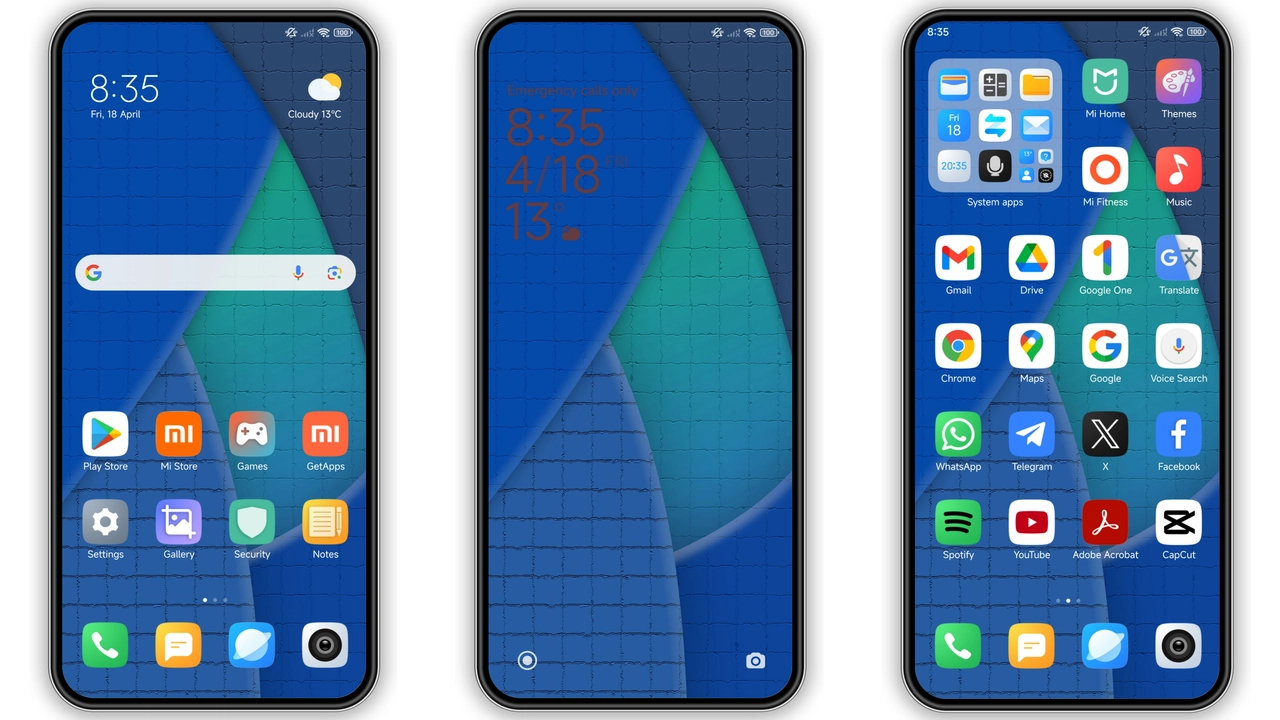
Vivid Blue Palette & Minimalist Icons
Blue Highlights paints UI in cool azure. Primary accent shifts to sky tone. Buttons, toggles adopt subtle gradient. Icons redraw in flat style. Corners round just enough. Text remains crisp white. Status bar inherits muted blue. Notification bubbles echo theme hue. Overall vibe feels calm yet lively. Sidebar panels adopt faint glow. Scrollbars tint to match. Dialog windows keep minimal border. Light mode remains untouched, preserving original look. Dark mode flips to deep navy, enhancing contrast.
Suggested Read: Putih Biru 3.0.3 – Tema HyperOS untuk Redmi, Poco, Mi
Smooth Wallpapers & Dynamic AOD
Wallpaper set features high‑res oceanic scenes. Images scale without pixelation. Lock screen adopts same palette, creating visual continuity. Always‑on Display glows in soft blue, showing time and notifications clearly. Battery icon turns teal when charging. Weather widget matches theme color. Transition animations slow slightly, adding polish. Swipe gestures retain responsiveness. No lag observed during app launch. Battery impact negligible. Theme respects system night schedule, switching AOD shade automatically.
Ideal Users & Everyday Appeal
Fans of clean aesthetics gravitate here. Professionals seeking non‑distracting UI find comfort. Gamers appreciate subtle accents that don’t clash with in‑game HUDs. Users with vision sensitivity like the gentle contrast. Those who love blue tones feel instantly at home. Community members who share custom icons enjoy easy integration. Early adopters of HyperOS appreciate native support. Redmi owners benefit from performance‑friendly design. POCO users notice smoother navigation.
Installation Flow & What to Expect
Download MTZ file via provided link. Open Theme Store app. Tap “Import” at bottom. Select downloaded file. Theme appears in My Themes list. Tap “Apply”. System prompts restart; confirm. Device reboots, loads new assets. First launch may show brief flicker—normal. Verify icons, wallpapers, AOD after reboot. If any element misaligns, re‑apply theme. No root required. Works on stock HyperOS and MIUI builds. Custom ROMs accepting MTZ files also compatible. No extra permissions needed. Theme size modest; download completes quickly on Wi‑Fi.
Pros and Cons
• Pros
• Cohesive blue aesthetic
• Lightweight, low RAM impact
• Native compatibility with HyperOS & MIUI
• Clear AOD visibility
• Easy one‑click install
• Cons
• Limited color variants
• No dark‑mode toggle beyond built‑in shift
• Icon set may clash with third‑party launchers
• AOD animation slower on low‑end CPUs
Theme Preview

Download Links
Use the buttons below to open the theme file and the supporting link.
Blue Highlights Theme mtz File
Helpful links
More Theme Updates
For more curated HyperOS and MIUI theme updates, visit Hyper OS x MIUI .


